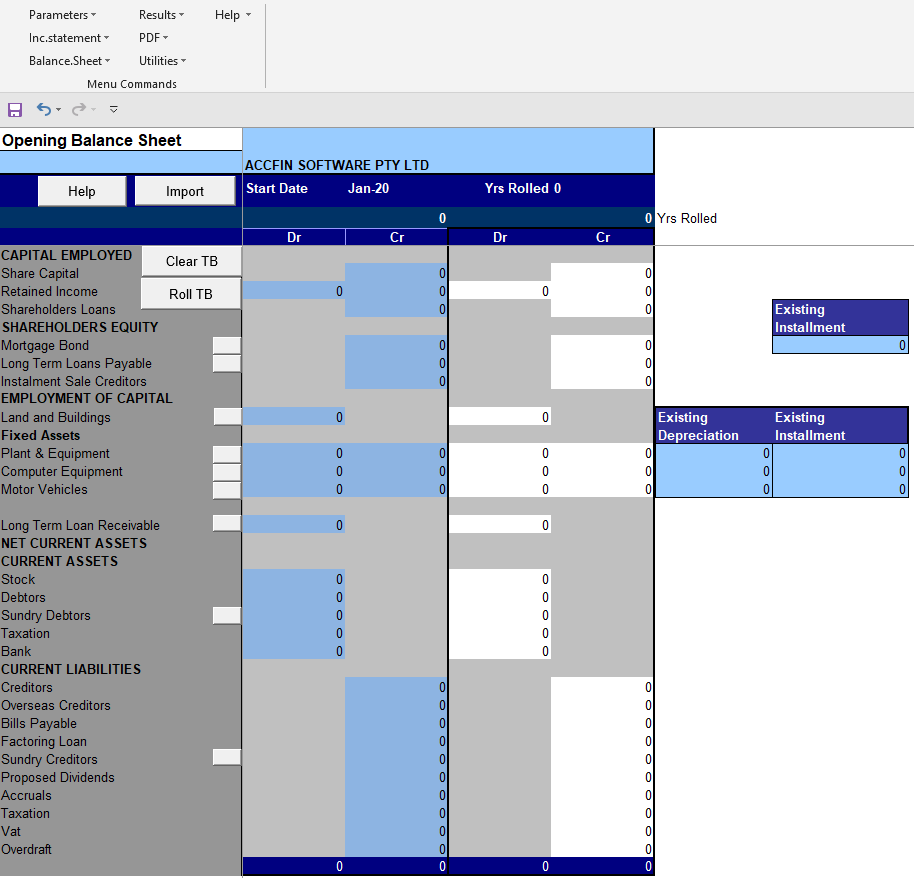
Existing businesses need to put in the opening trial balance or balance sheet. Where it is necessary and the books are not up to date to get an accurate TB make estimates so that you can get an idea of the cash flow.
There are various buttons that will allow you to clear the TB. There is also a roll button Used to do projections for multiple years. By clicking on this button you may roll these years on a TB as many times as is required. If you roll don’t forget to save your file before you roll.
You will also notice that some of the titles have little buttons to the right and if you click on these little buttons it will force you to type in a new name for the line item on the TB. This gives you the ability to change the line item for example if you wanted to make mortgage bond a long term loan you would click on the little button and then type in long term loan and this will populate throughout the whole cash flow.
Balance Sheet
Opening Balance Sheet
In the case of an existing trading company it will be necessary to input an opening trial balance.
This screen is where the opening balance sheet balances or trial balance is inserted as a starting position on day 1 for the detailed month by month plan. It is important that it balances. Insert the opening trial balance into the blue area.
The pink area or 3rd and 4th area displays the closing trial balance i.e the closing calculated result of the detailed month by month plan. This is the same as the final Balance Sheet and cant be edited as it is calculated.
When preparing the opening balances it may be necessary to group a whole number of items on the balance sheet together in order to make it fit. E.g., Group deposits and staff loans with the Sundry Debtors balances.
NOTE
When entering an accumulated loss insert the amount into the debit column in the Retained Income Line.
Where fixed assets have a provision for depreciation account enter the provision in the credit column. Enter the monthly deprecation in the space provided to the right. If the asset was acquired under a Instalment Sale Credit Agreement enter the monthly payment in the space provided.
Where there is a mortgage loan on Land and Buildings enter it in the credit column next to the mortgage line and enter the monthly instalments to the right of that.
Monthly Depreciation and Instalment Sales Payments
The Opening Trial Balance area allows you to enter the monthly depreciation and the monthly credit instalment payments in respect of all the fixed asset types. By entering the Depreciation and Instalment Sale Payments here, the fixed assets and credit instalment assets schedules are updated automatically. This information is in respect of the previous year. E.g. If there is an opening balance on fixed assets it will be necessary to write off depreciation. Take the depreciation for the fixed asset in question and insert it into the slot provided. Note that you should enter the monthly amount. Where you acquire a new asset the depreciation in respect of the new asset will be automatically calculated in the fixed asset acquisition sheet based on the perecntage of depreciation entered.
Loading Opening Balances From Another File
Where you are working on a number of different years and you find it necessary to go and adjust something in an earlier year it will always be necessary to adjust the opening balances of a later year that you are still working on. Cash Flow Forecaster automatically updates the opening balances if you set it up correctly. You can do this manually or automatically by clicking on the appropriate button.
December 2022