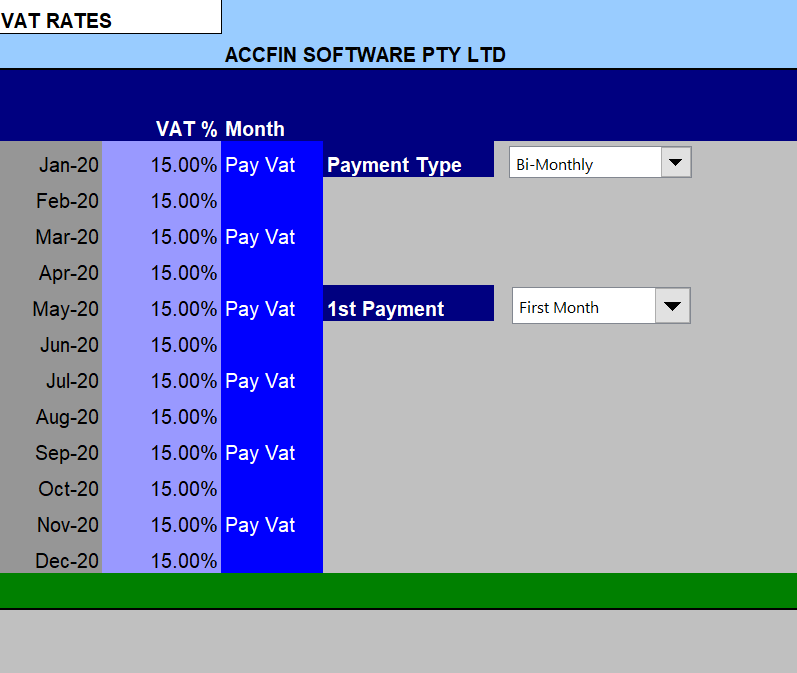
Enter your VAT Rate details here. You may set a number of different options, as to the month of payment and the payment type. Where there are reduced rates or non vatable like vat free the rates can be changed on the Sales Screen.
VAT Vendor
If the business is not registered as a Vat Vendor set the vat rates in the system to zero by over typing 15% to 0.
VAT Percentage
Enter the Standard VAT rate in the first field of this column. If the VAT rate changes in a particular month then move the cursor to that month and change it. To enter 16% enter it as 16. If there is no Vat enter 0.
VAT Payment Type List Box
Monthly or Bi-monthly
Select either Monthly or Bi-monthly. If you select monthly vat will be paid on a monthly basis otherwise it will be paid every 2nd month.
First Payment - Month 1 or Month 2 - List Box
Indicate when you make the first VAT payment. If it is in the first month select Month One otherwise Month Two. VAT Cash or Invoice
All businesses must work on the invoice basis.
If the business is not a registered VAT vendor ensure that the VAT rates in the Parameter screen are set to 0.