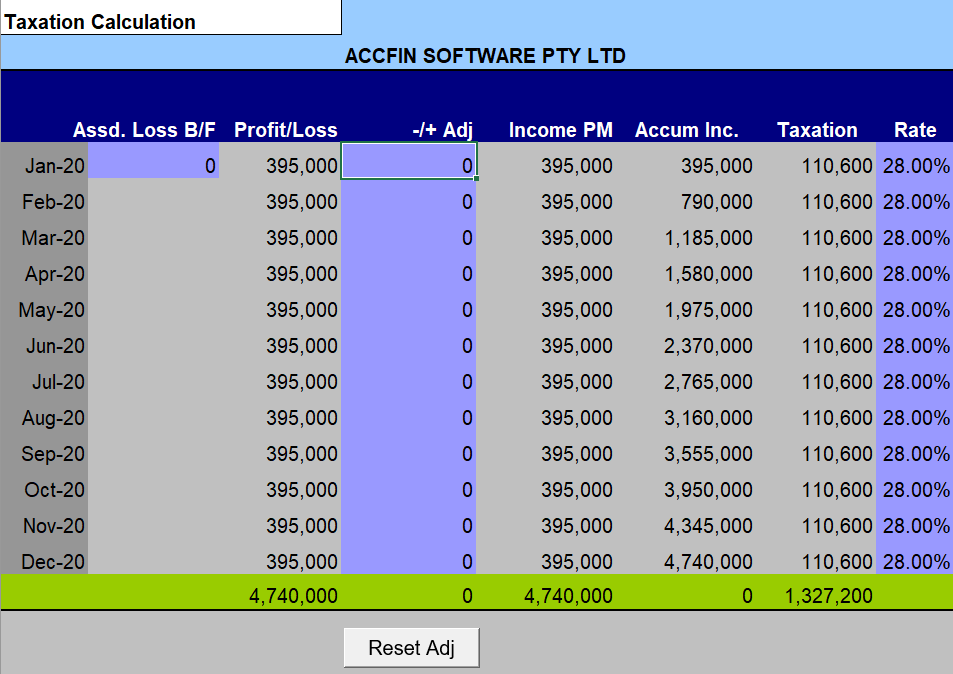
This option is for entering normal tax rates as well as any assessed loss brought forward and tax allowances. Where your company makes use of the small business rates then it is best to work out your average rate of tax according to the tables and enter the average rate as a percentage in the rate column provided. In a future version we will make this automatic.
Assessed Loss bf
(Input)
Where the business enterprise has an assessed loss brought forward from a previous year or an estimated tax loss from a previous year enter it in this field. The rest of the period’s loss will calculate automatically based on the information pulled through from the Income Statement.
Tax Profit or Loss
(Display only)
This is the profit or loss contained in the income statement added to the previous months Taxable Income carried forward.
Tax Adjustment
(Input)
Where the business enterprise is entitled to tax allowances which do not form part of the income statement enter them in this column in the month in which they occur. An example of this kind of allowance would be the exporters allowance or a government grant that is not taxable. Enter a minus sign to reduce taxable income and a plus sign to increase taxable income.
Tax Income PM
(Display only)
This column calculates the taxable income carried forward based on information in the income statement, any losses brought forward and any allowances.
Tax Accumulated Inc
(Display only)
This reflects the accumulated income until that point, e.g., Mth 6 will reflect the accumulated income from months 1 - 6.
Tax Rate
(Input)
This allows input of the Tax rate.
Tax Calculation
(Input)
This reflects the taxation calculated for the month.
This screen displays the liability for taxation as well as all the movements. You may input payments in the form of provisional tax payments as well as payments of assessments.