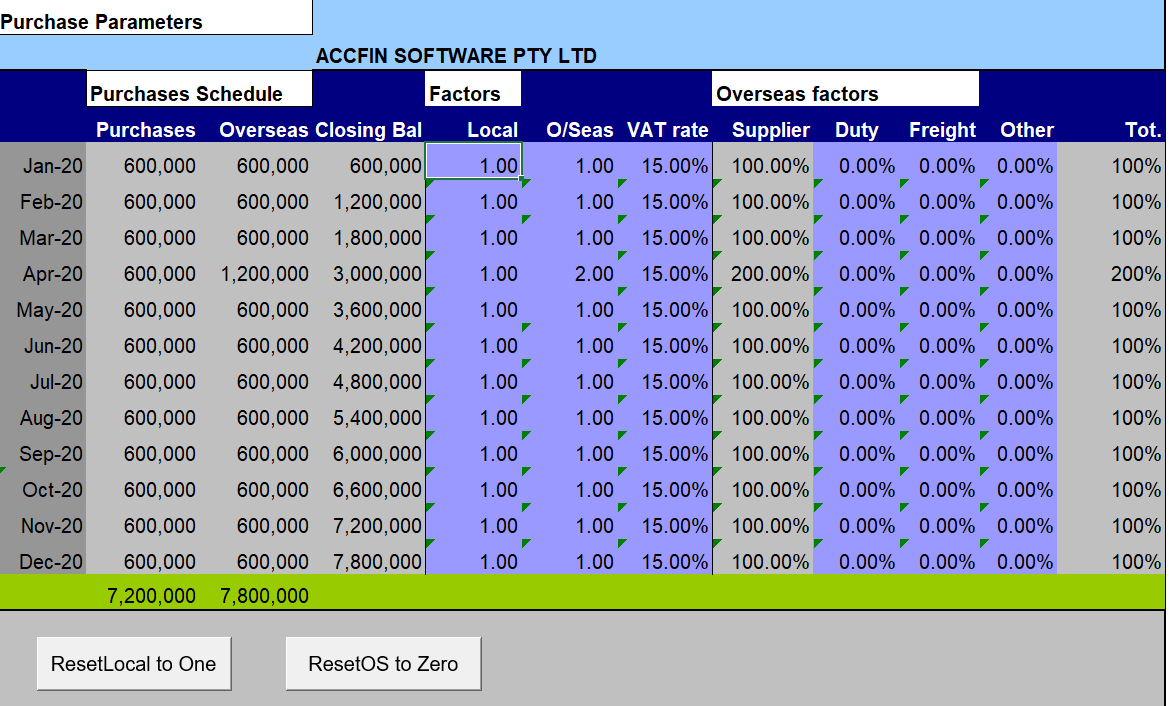
The screen below is where you set up the purchases. A factor basis is used to tell the system how much stock is to be purchased. The purchases factor can be set up for the purchase of local stock and overseas stock on the screen below.
Purchases Factor
A purchase factor of 1 represents the value of the cost of goods sold that are purchased to replace what is consumed. 1 will keep the stock the same i.e replace the goods consumed. A factor of greater then 1 represents the percentage increase of the amount greater then 1 of purchases and will increase the stock level accordingly and have an impact on cash flow.
Purchases are for goods for resale or for raw materials in a manufacturing company. For the purpose of this excercise stock is valued at the cost of materials even in a manufacturing concern. If the stockholding has to be increased for any seasonal fluctuations, then the factor must be greater than 1. E.g., if the factor is 1.2 then that months purchases will be 20% more then that months cost of goods sold or goods consumed. This means that the stock level will be increased by 20% over an above goods consumed. If you wish to reduce the stock level make the Factor less than 1 i.e. .80 (point 8) - this will calculate purchases of 80% of the cost of goods for that month or the goods consumed.
If you do not wish to use the factor basis you may enter the actual amount of purchases in the adjustment column of the stock sheet and by setting the factor to zero.
By playing what if with the purchases factor, see the effect that it has on the cash flow once your model is set up.
The amount of purchases will be entered into the creditors sheet.
Purchases VAT Rate
Enter the Vat rate that applies to local purchases here. You can adjust to an average rate if required.
Purchase Parameters Overseas
This screen also deals with overseas purchases parameters which can work simultaneously with the local purchases. In other words you can purchase from local suppliers as well as overseas suppliers. If all the purchases are overseas, ensure that the local purchases parameters are set so that there are no local purchases i.e. 0. In other words change the factor on local purchases to zero. If you purchase from both, work out the percentage e.g say local is 70% and overseas is 30% make the factor on local .7 and on overseas .3.
Duty
Enter the percentage of the duty. E.g if the duty is 5% enter.
Freight
Enter the percentage of the freight. E.g if the freight is 5% enter.
Other
Enter the percentage of the other costs. E.g if the other costs is 5% enter.
The cost of duty freight and other is calculated as a percentage of the purchase and will be added to stock and to creditors. In the model it is treated as and expense.
Purchases / Overseas / Closing Balance
The purchase amount is calculated based on the factor multiplied by cost of goods sold. The percentage of costs i.e. duty, freight and other is included in purchases. The credit or liability side of these expenses will be added to a local creditors.
Supplier Duty Freight Other
Where you calculate overseas purchases the liability for the local supplier will be transferred to Trade Creditors and the liability for the overseas supplier will be transferred to Overseas Creditors.
Overseas Purchases Schedule
This is a schedule of overseas purchases. In some instances it is difficult to get a vat figure based on percentages you can change the vat figure here to the actual value.
December 2022