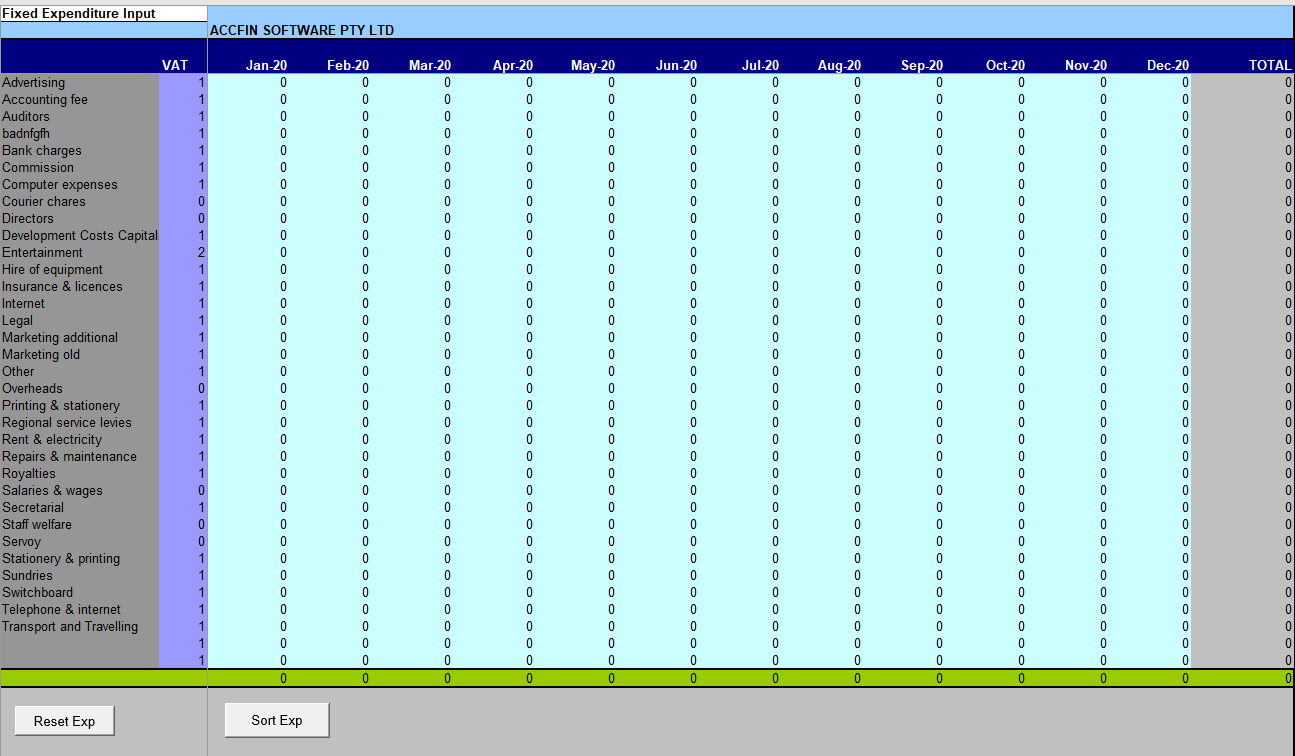
The expenditure title may be changed to any title by moving the cursor to the required description and over typing the field with a new narration.
Monthly expenditure
To enter a monthly expenditure amount, move the cursor to the required expense and enter the amount in the first Monthly Expense column. The total expense will be calculated in the total expenditure column. The expenditure amount must be entered before VAT is calculated.
You may override any expenditure for seasonal fluctuation.
Fixed Expenditure VAT Input
A flag for each expense item must be inserted to determine the VAT that will be paid.
0 Flag means this is an `Exempt Supply'. The supplier does not charge VAT.
1 Flag means this is taxable. The supplier charges VAT on goods and services. The VAT paid can be recovered from SARS.
2 Flag means VAT is charged but is not recoverable from SARS. The VAT paid becomes an additional cost to the business and is included in Expenditure.
Note: All expenditure is inserted excluding VAT other when the VAT flag is 2.
Sort Buttons
There are to sort buttons on the bottom of the screen, one is to set all the expenses to zeo and one to sort the expenses by description.
Fixed Expenditure
The Income Statement sheet displays the end result of Fixed Expenditure input. None of the figures displayed here may be edited. In order to see the input of fixed expenses go to Fixed Expenditure Input.
Non Cash Expenditure will come from debtors being bad debts and fixed assets being depreciation.